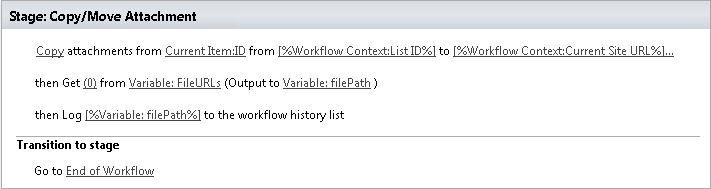
Copy/Move Attachment
Previously documented as “Copy/Move Attachments”.
This activity allows to copy/move attachments from list item to other folder. Cross site copy is supported.
SharePoint Designer phrase

Parameters
Output parameters
| Parameter | Description | Example |
|---|---|---|
| URLs | Returns a list of copied files | Variable:fileURLs |
Input parameters
| Parameter | Description | Example |
|---|---|---|
| Method | Copy or Move | Copy(0), Move(1) |
| ItemID | The ID of the source item. | Variable:ItemID |
| List identifier | The list where the item | [%Workflow Context: List ID %] |
| will be stored. The value could be list name, guid or list url (the web site relative URL). If the value field is empty, current listwill be used. | /Lists/Tasks Tasks | |
| DestinationUrl | The URL where the source folder will be copied/moved. You can use absolute URL as well as web site relative URL | https://contoso/SiteUrl/LibraryName/FolderName[%Workflow Context:Current Site URL%]/siteURL/Source Documents/Documents/ |
| SiteURL | The URL of a SharePoint site. If the value field is empty, current site will beused. | [%Workflow Context:Current Site URL%]/ https://contoso/SiteUrl/ |
| Overwrite | Overwrite a file if thereis a file with the same name | Yes/No |
Example