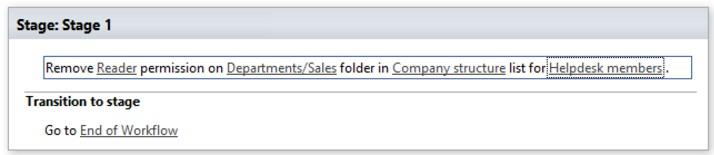
Remove permissions from folder
Note: Virto Workflows for Office 365 is no longer sold. The add-in and the SharePoint 2013 workflows it adds actions to stopped working in SharePoint Online on April 2, 2026, when Microsoft retired SharePoint Add-ins and SharePoint 2013 workflows. This documentation is kept for reference.
This activity removes permissions from specified folder. Value of permission field by default can be one of the following values:
None
Guest
Reader
Contributor
Web
designer
Administrator
Editor
System
SharePoint Designer phrase
Remove Reader permission on this folder in current list to user(s)/group(s).
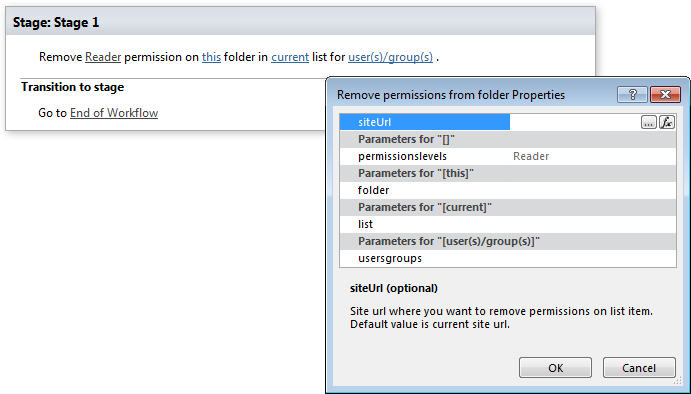
Parameters
Input parameters
| Parameter | Description | Example |
|---|---|---|
| siteUrl | The URL of a source SharePoint site. If the value field is empty, current sitewill be used. | https://contoso/SiteUrl; https://contoso/Sites/SiteUrl; [%Workflow Context:Current Site URL%]/subSite |
| Permission level | Permission level | None; Guest; Reader; Contributor; Web designer; Administrator; Editor; System |
| this folder | Folder path inside selected list/document library | Folder 001; Top Folder/Sub folder 1/sub folder2 |
| current list | Name or Url of chosen list. If the value field is empty,current list will be used. | Tasks; [%Workflow Context:List Name%] /Lists/ Tasks |
| User(s)/group(s) | User login, e-mail, group name, group ID | “user@domain”, “domain\user”. It allows multiplevalues separated by a semicolon. |
Example