Get List Items
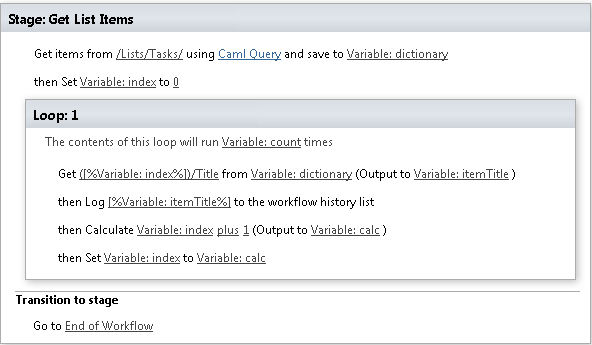
This activity allows getting list items using Caml Query from any site. SharePoint Designer phrase

Parameters
Output parameters
| Parameter | Description | Example |
|---|---|---|
| Items | The dictionary that representsthe items | Variable:Items |
| Item Count | The number of items in thedictionary | Variable:Count |
Input parameters
| Parameter | Description | Example |
|---|---|---|
| List identifier | List for querying. The value could be list name, list base template, guid (not supported with multiple sites) or list URL (The web site relative URL). ). If the value field is empty, current list will beused. | Documents[%Workflow Context: List ID %] 107/Lists/Tasks |
| Caml Query | CAML query that will be run | <View Scope='RecursiveAll'><Query><Where><Contains><FieldRef Name='FileLeafRef' /><Value Type='File'> .docx </Value></Contains></Where> |
<OrderBy><FieldRef Name='ID' /></OrderBy></Query><ViewFields><FieldRef Name='FileLeafRef' /><FieldRef Name='FileRef' /></ViewFields><RowLimit>10</RowLimit></View> | ||
| Folder Path | The web site relative URL of a list folder from whichresults will be returned | /Lists/ListName/Folder1/SubFolder |
| Site URLs | The URLs of a SharePoint sites (semicolon delimited). If the valuefield is empty, current site will be used. | https://contoso/SiteUrl; https://contoso/Sites/SiteUrl;[%Workflow Context:Current Site URL%]subSite |
Example