
Contact us
View as Markdown
Ask AI

Open this page in an AI assistant with a ready-made prompt.

Opens a third-party service and shares a pre-filled prompt containing this public page URL, its product documentation URL and /llms.txt. No VirtoSoftware account or tenant data is included. Provider terms and privacy policies apply. Verify answers against the linked documentation.

OpenAI terms · OpenAI privacy policy · Anthropic terms · Anthropic privacy policy

Editing Fields in Datasheet View

Current limitation: values of Virto Cross-Site Lookup Selector columns are entered and shown in the classic list forms. In the modern list view and in Quick edit, these columns show “[object Object]” instead of the value.

The steps below show editing Virto Cross-Site Lookup fields in Datasheet View of an earlier SharePoint version. Switch to Datasheet View.
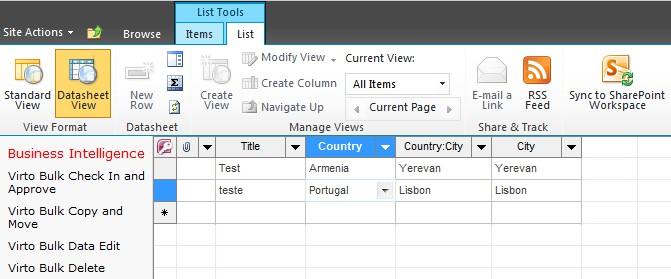
Switching a SharePoint list to Datasheet View to edit Virto Cross-Site Lookup fields

Make changes to required fields right on the page without moving to edit item window.
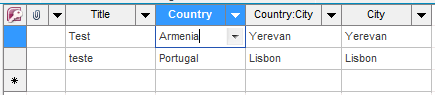
Editing lookup field values directly in Datasheet View without opening the edit item window

After editing dependencies will not work as before.

Updated on October 21, 2026