Remove permissions from list
Note: Virto Workflows for Office 365 is no longer sold. The add-in and the SharePoint 2013 workflows it adds actions to stopped working in SharePoint Online on April 2, 2026, when Microsoft retired SharePoint Add-ins and SharePoint 2013 workflows. This documentation is kept for reference.
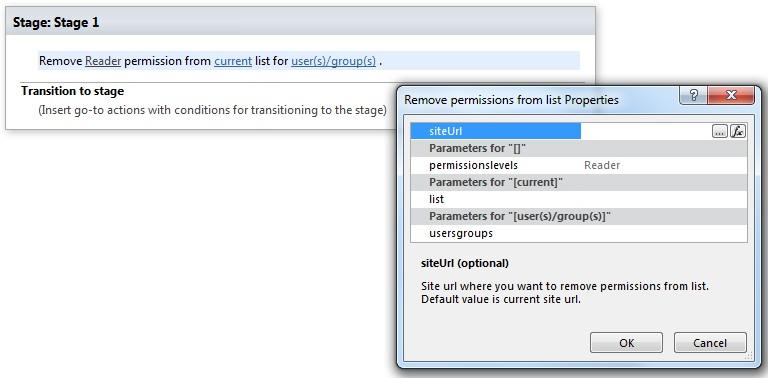
This activity removes permission assignment from list. SharePoint Designer phrase
Parameters
Input parameters
| Parameter | Description | Example |
|---|---|---|
| The following | Permission level string. Multi permission assignments are supported. Use ‘,’ or ‘;’ separator to grant several permission.Example: | Approve, Read, View Only. |
| Current list | Title or Url of chosen list. If the value field is empty, current list will be used. | Tasks[%Workflow Context:List Name%]/Lists/ Tasks |
| SiteURL (optional) | The URL of a source SharePoint site. If the value field is empty, current site will be used. | https://contoso/SiteUrl; https://contoso/Sites/SiteUrl;[%Workflow Context:Current Site URL%]/subSite |
| User(s)/group(s) | User login, e-mail, group name, group ID | “user@domain”, “domain\user”. It allows multiple values separated by a semicolon. |
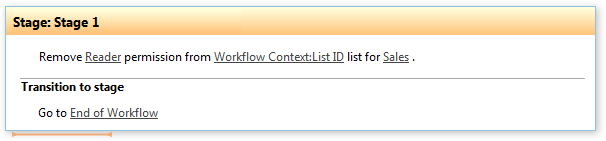
Example
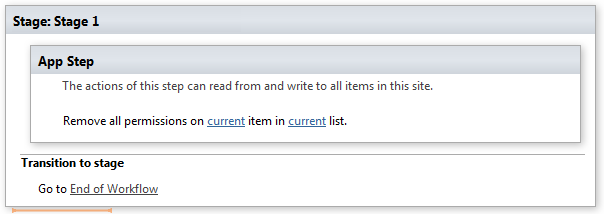
Note: We recommend you to run all Virto Permissions actions inside App Step to avoid failing of your subsequent actions inside the workflow.
Example