
Virto Apps
A Global Administrator can manage the Virto Apps (Virto Authorization App) via the Azure Active Directory portal at https://portal.azure.com/. You can locate it by navigating to Azure Active Directory => Enterprise application => Virto Apps.
Virto Calendar App and Virto Kanban Board App sign in through this application. It lets them work with SharePoint, Outlook, Planner and other Microsoft 365 services as the signed-in user. The two apps share this one entry: consent given for either covers both. Virto Forms Designer App, Virto Charts and Virto Alerts & Reminder App sign in through Entra apps of their own, Virto Forms Designer, Virto Charts and Virto Alerts App, and do not use Virto Apps.
Delegated permissions are used when an application acts on a user’s behalf. They allow the application to access only what the user themselves can access. For instance, if an application is granted delegated permission to read files on behalf of a user named Alex, it can only read the files that Alex has access to. Important: in delegated access, both your client app and the signed-in user must be authorized correctly. Simply granting a scope is not sufficient. If the client app lacks the necessary scope or the user lacks sufficient rights to read or modify the resource, the call will fail.
To review permissions, navigate to the Security => Permissions menu on the left-hand side. Here, you’ll find all the permissions granted to VirtoSoftware applications for users, consistent with the permissions set for users in SharePoint, Exchange, and other Microsoft products.
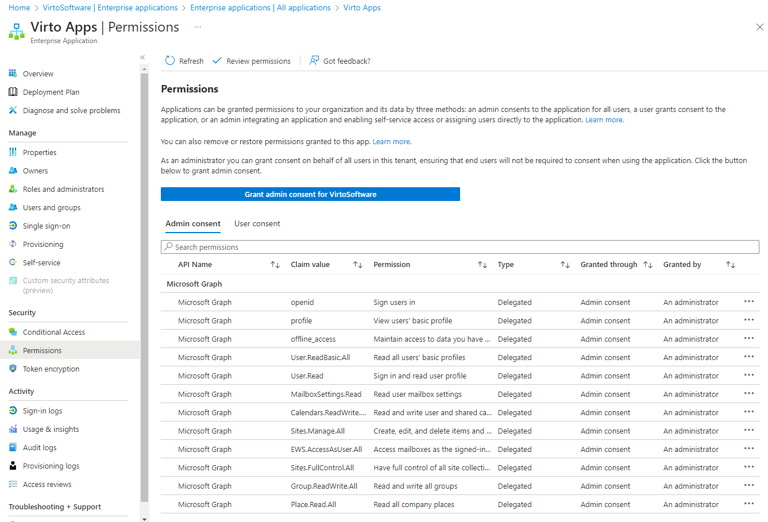
If the administrator removes app permissions, it might make the apps work poorly. To fix any issues and ensure the app works correctly, it must be reinstalled. To do it, first uninstall the app by clicking “Delete” on the ribbon.
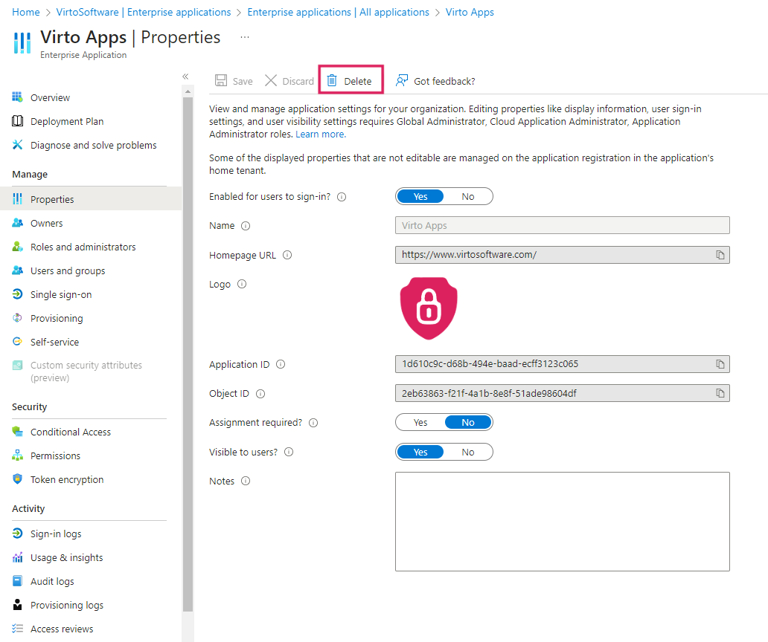
Then open Virto Calendar App or Virto Kanban Board App — a pop-up to install the Virto Apps will appear (though not immediately, as the browser cache needs to be cleared). To reinstall the application instantly, open either app in incognito (private) mode.