
Usage
When Virto Workflow Scheduler is installed, go to SharePoint site settings and find “Virto Workflow Scheduler” link in the “Site Collection Administration” settings.
You will be redirected to Virto Workflow Scheduler page, where you can manage your workflows.
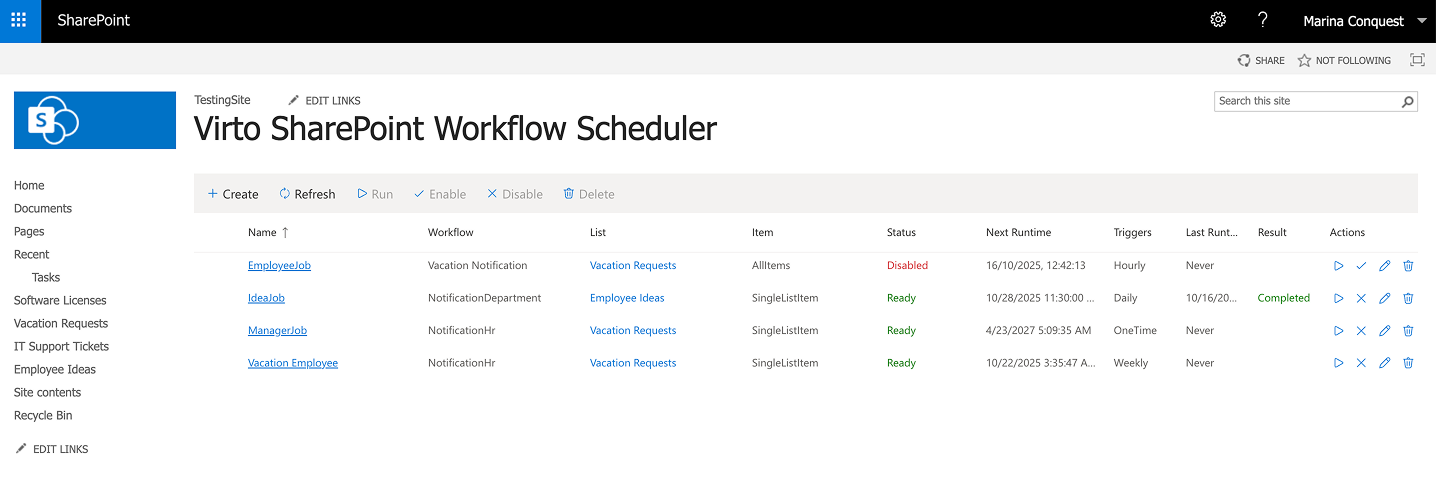
Schedules are run by the SharePoint timer job Virto Workflow Scheduler Timer Job every 10 minutes. A workflow starts within about 10 minutes after its Next Runtime, and only in site collections where Virto Workflow Automation is active. The SharePoint Timer Service must be running.
The site and list selectors show only sites and lists on which the current user has the View Items permission and that have workflows. The schedule list shows only schedules for such sites and lists.
Virto Workflow Scheduler is also available as a web part: see Working with Workflow Scheduler as a Web Part.