
Viewing Workflow Information with Virto Workflow Status Monitor
Virto SharePoint Workflow Status Monitor allows you to track running business processes on your SharePoint site. Go to a required SharePoint site and find the Site Settings page.
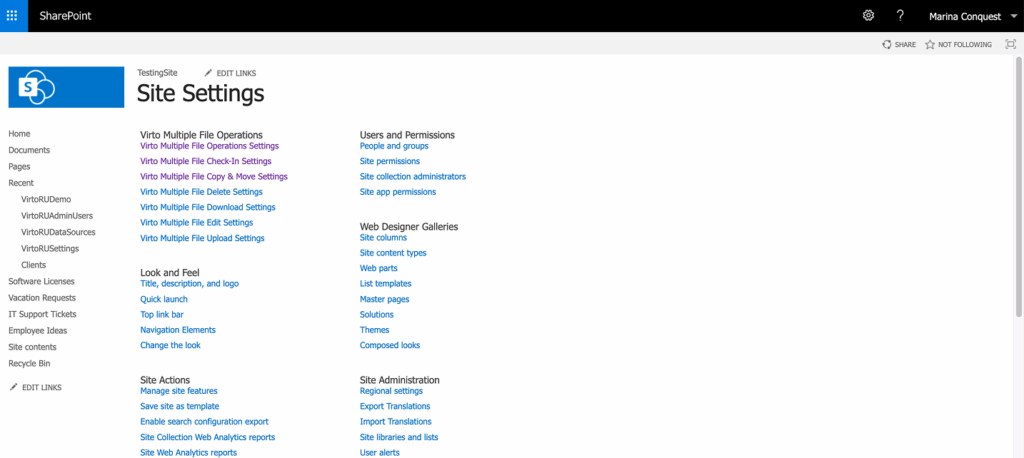
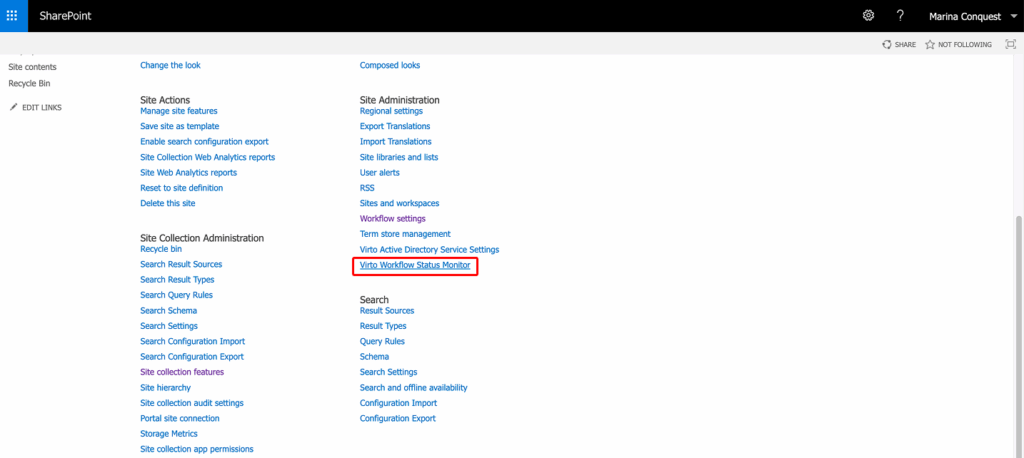
Then find the Virto SharePoint Workflow Status Monitor within the Site Administration section.
On the workflow monitor page, use the filters All sites, All lists and All Statuses and click Search workflows to view the list of workflows. When the list is loaded, it will be displayed on the page.

- If you open the main site, you will be able to select any subsite (or all sites) and any list on this site (or all in the list on the site).
- If you open a subsite, you will be able to select only a list or all lists (selection of a site will be disabled; only the current site will be displayed).
- If you open the list settings page, you won’t be able to select any other source of workflows.
- If the status monitor is used as a web part, the first three options are available depending on the web part settings.
Select workflows to show the Restart and Terminate buttons. The icons on the right open Workflow statistic and Settings.
The Status column shows the state reported by SharePoint, for example In Progress, Completed, Error Occurred, Canceled, Terminated, Suspended, Failed On Start, or a custom status set by the workflow (such as Approved).
The list includes the following fields with data:
- Workflow– name of a running workflow;
- Site/List– a site or list this workflow belongs to;
- Item– an item related to this workflow;
- Item Id - ID of an item related to this workflow;
- Status– current state of a workflow;
- Started– the date when this workflow was started;
- Initiator– a person initiated this workflow;
- Version - SharePoint version;
- Actions - actions to perform with this workflow
With Virto SharePoint Workflow Status Monitor, you no longer need to locate the related item to see all this information.