
Contact us
View as Markdown
Ask AI

Open this page in an AI assistant with a ready-made prompt.

Opens a third-party service and shares a pre-filled prompt containing this public page URL, its product documentation URL and /llms.txt. No VirtoSoftware account or tenant data is included. Provider terms and privacy policies apply. Verify answers against the linked documentation.

OpenAI terms · OpenAI privacy policy · Anthropic terms · Anthropic privacy policy

Activating Activities Kit

When the installation process is complete, go to the SharePoint site and find “Central Administration - Application Management - Manage Web Application Features”.
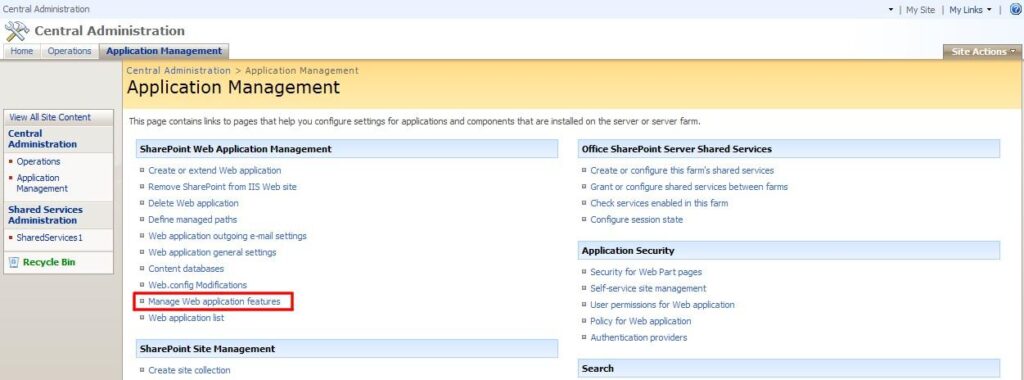
Manage Web Application Features page in SharePoint Central Administration under Application Management

Activate the feature for desired web applications (usually it’s SharePoint - 80 or SharePoint - 443).
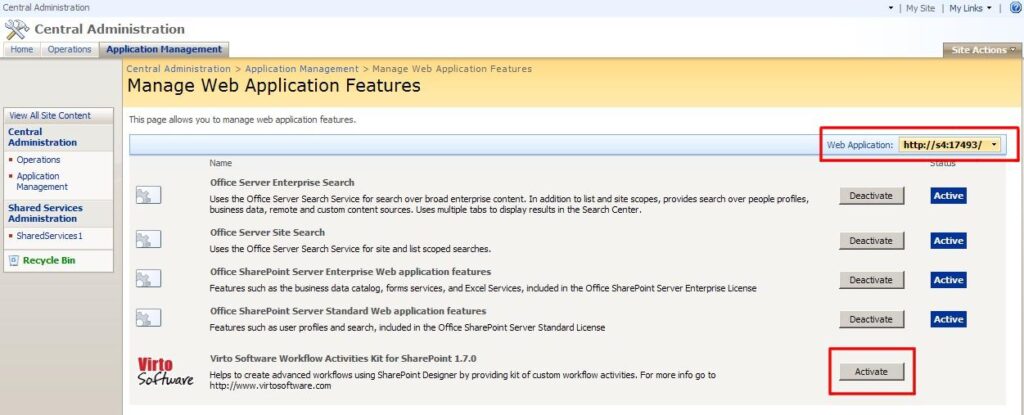
Activating the Virto Workflow Activities Kit feature for the desired web application in SharePoint

Note: make sure that you selected the web application on which the web part is installed. If not, select the required Web Application using “Change Web Application” button.
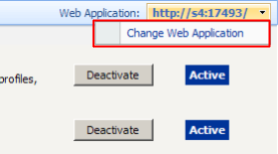
Change Web Application button used to select the web application where the web part is installed

Updated on August 12, 2026