# Calculate aggregate function
Source: [https://docs.virtosoftware.com/docs/virto-workflow-automation-app/virto-workflows-for-office-365/mathematical/calculate-aggregate-function/](https://docs.virtosoftware.com/docs/virto-workflow-automation-app/virto-workflows-for-office-365/mathematical/calculate-aggregate-function/)
Product: Virto Workflow Automation App
Updated: 2026-08-12
This activity finds list by url and calculates aggregate numerical function from a numeric column for selected item in list and store result in variable.

## **SharePoint Workflow Designer Phrase**
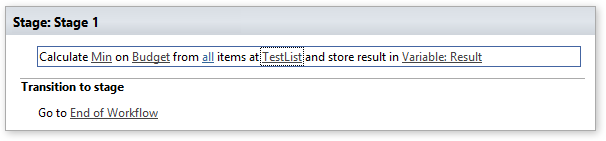
Calculate this function on this field from all items at list url and store result in variable
## **Parameters**
Input parameters
| Parameter | Description | Example |
|---|---|---|
| this function | Name of the aggregate function. | Available Functions: Count, Avg, Min, Max, Standard Deviation, Mode. |
| this field | **Optional.** Numerical field on which mathematical function will be performed. Field display name. Field unique ID (Guid). Field index (int).Not required for Countfunction. | FieldName 23{F3DF15C2-F16E-4FD3-85F6-7EE05227A079} |
| All | **Optional.** List item filter. The filter string supports View Name, View ID andCAML string (`...`). | `` |
| | Empty filter returns all items. | ` .docx ` |
| list identifier | List name, list base template, guid or list url | Ex: http://mysharepoint/MyDocs/Shared%20Documents Ex:http://mysharepoint/Lists/List%20with%20Approve |
| Variable | This activity will place function result into an output variable (Double). | |
## **Available Functions**
| Name | Description |
|---|---|
| Count | Total number of items |
| Sum | The sum of items |
| Avg | Average of values from the specified column |
| Max | Smallest non-null value in the specified column |
| Min | Largest non-null value in the specified column |
| Standard Deviation | A measure of the variation in a distribution of values from the specified column, equal to the square root of the arithmetic mean of the squares of the deviations from the arithmetic mean; the square root of the variance[http://en.wikipedia.org/wiki/Standard\_deviation](http://en.wikipedia.org/wiki/Standard_deviation) |
| Mode | The mode is the value that occurs the most frequently in a data set or a probability distribution.[http://en.wikipedia.org/wiki/Mode\_%28statistics%29](http://en.wikipedia.org/wiki/Mode_%28statistics%29) |
Example