# Loop through list items and update list items
Source: [https://docs.virtosoftware.com/docs/virto-workflow-automation-app/virto-workflows-for-office-365/list-processing/loop-through-list-items-and-update-list-items/](https://docs.virtosoftware.com/docs/virto-workflow-automation-app/virto-workflows-for-office-365/list-processing/loop-through-list-items-and-update-list-items/)
Product: Virto Workflow Automation App
Updated: 2026-08-13
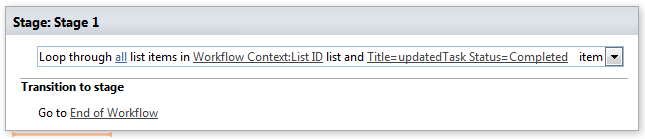
This activity allows looping through list items and updating multiple list item fields.
## **Parameters**
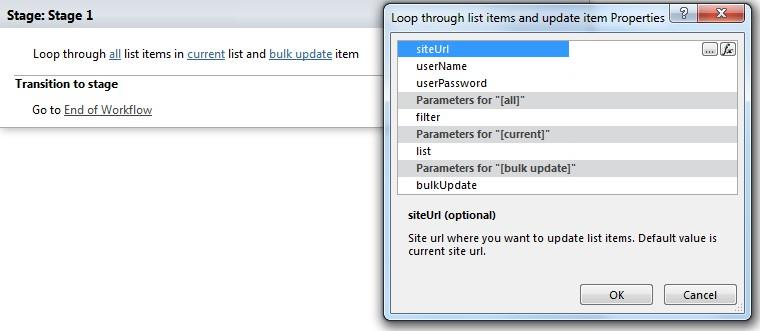
Input parameters
| Parameter | Description | Example |
|---|---|---|
| All (optional) | List view id (or name) or caml query (` … `) for getting list item(s). | `test` |
| Current list (optional) | List id (guid) or name where you want to get list item url. Default value is current workflow context list. | [%Workflow Context: List ID%] |
| Bulk update | Bulk update for list item. FieldName = FieldValue splitted by Enter key. Use `<%FieldName%>` in the right part of equation to reference list item value for the field. | Description=Test Description Start Date=2010-12-10T12:30:00Published=1 Choice=My Choice #3 Lookup=12;# |
| Site URLs (optional) | The URLs of a SharePoint site where you want to update list item. If the value field is empty, current site will beused. | https://contoso/SiteUrl; https://contoso/Sites/SiteUrl; [%Workflow Context:Current Site URL%]subSite |
| User name (optional) | User login name who you want the workflow must be run under | |
| User password (optional) | User password who you wantthe workflow must be run under | |
## **Example**